

Description
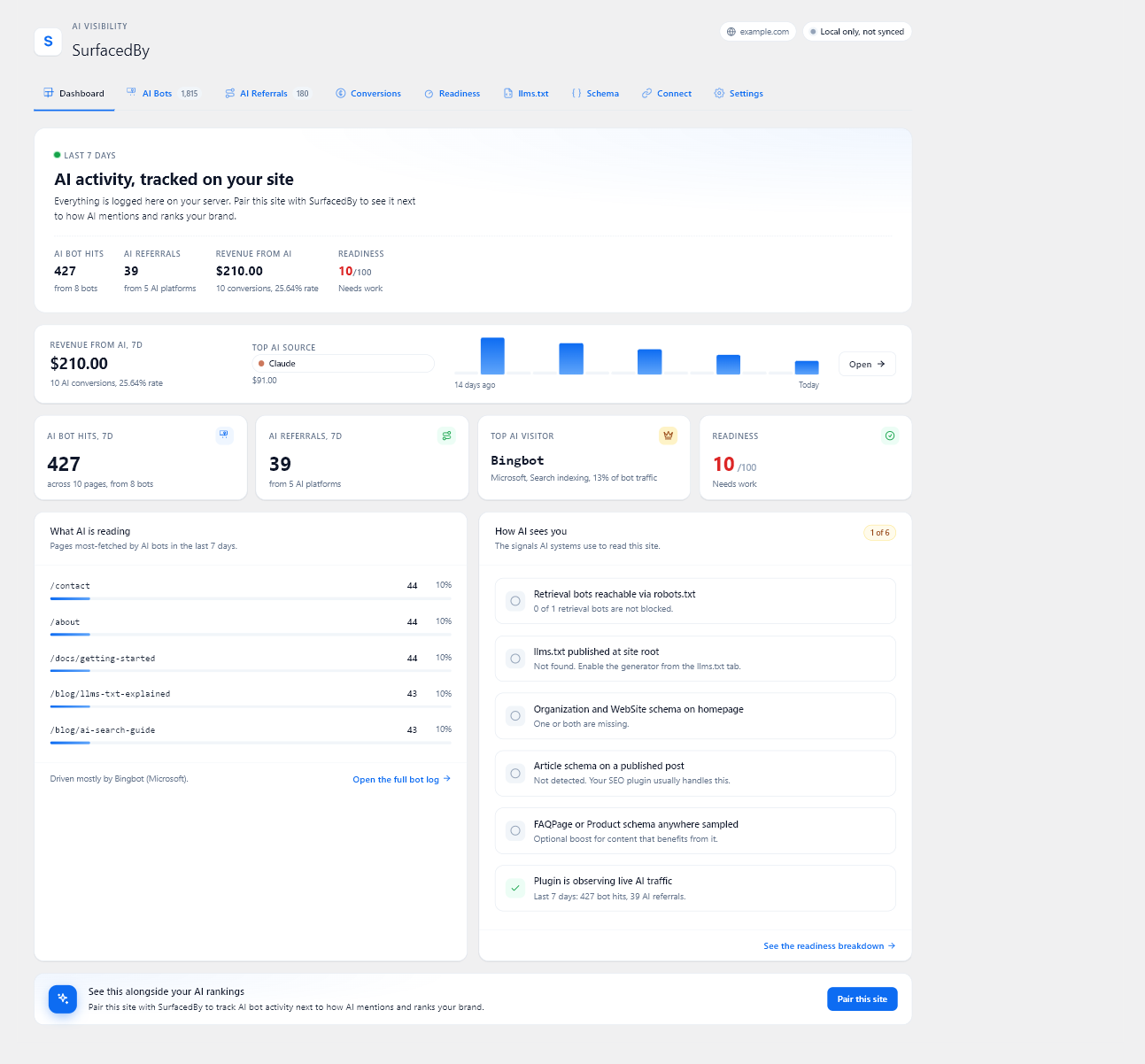
People can find your store through AI assistants as well as search engines. SurfacedBy shows which AI crawlers request your pages, which assistants send visitors, and whether those visits lead to orders or signups. A visit from an AI assistant does not, on its own, mean your store was cited in an answer.
The plugin gives you these tools in your WordPress dashboard:
- AI crawler analytics. See requests from 19 known AI crawlers and content retrieval tools. After you connect to SurfacedBy, supported crawlers can be checked against reliable address information. Requests that cannot be verified are shown separately.
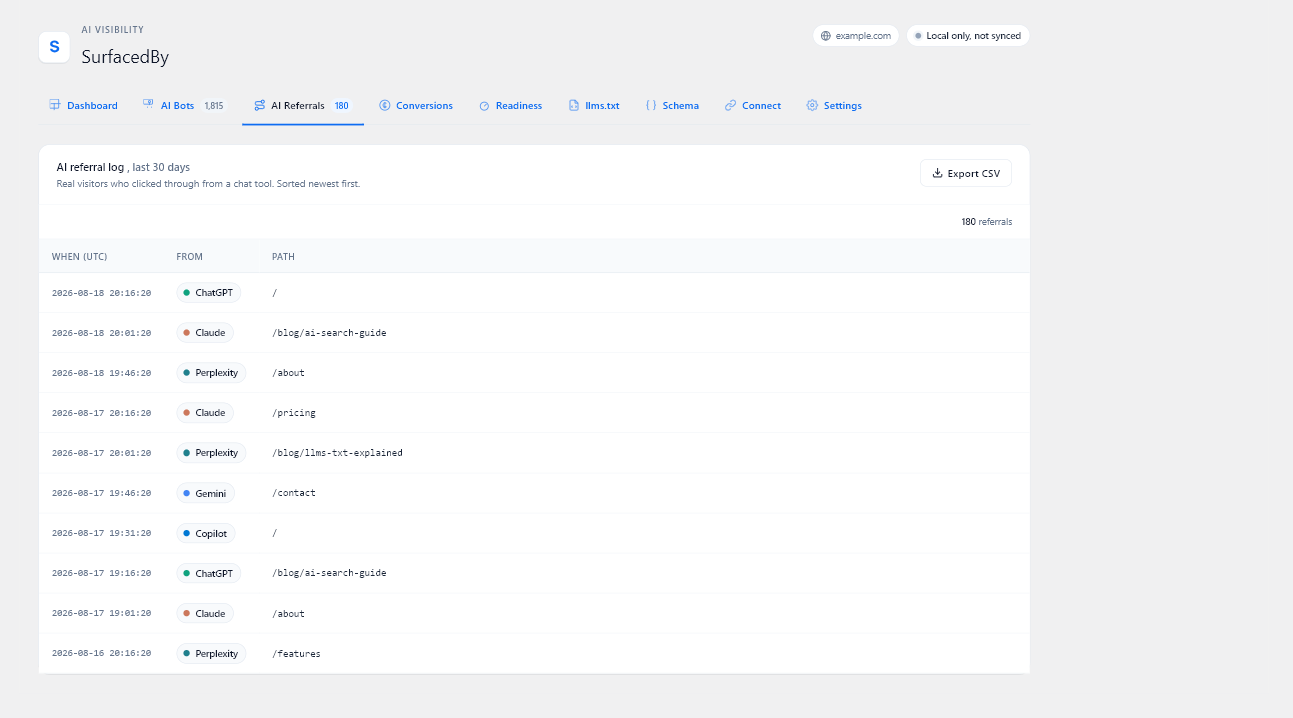
- AI referral tracking. See visits from chatgpt.com, claude.ai, perplexity.ai, gemini.google.com, copilot.microsoft.com, grok.com, deepseek.com, and meta.ai. The source tells you where a visitor came from, but does not show whether an AI answer cited your site.
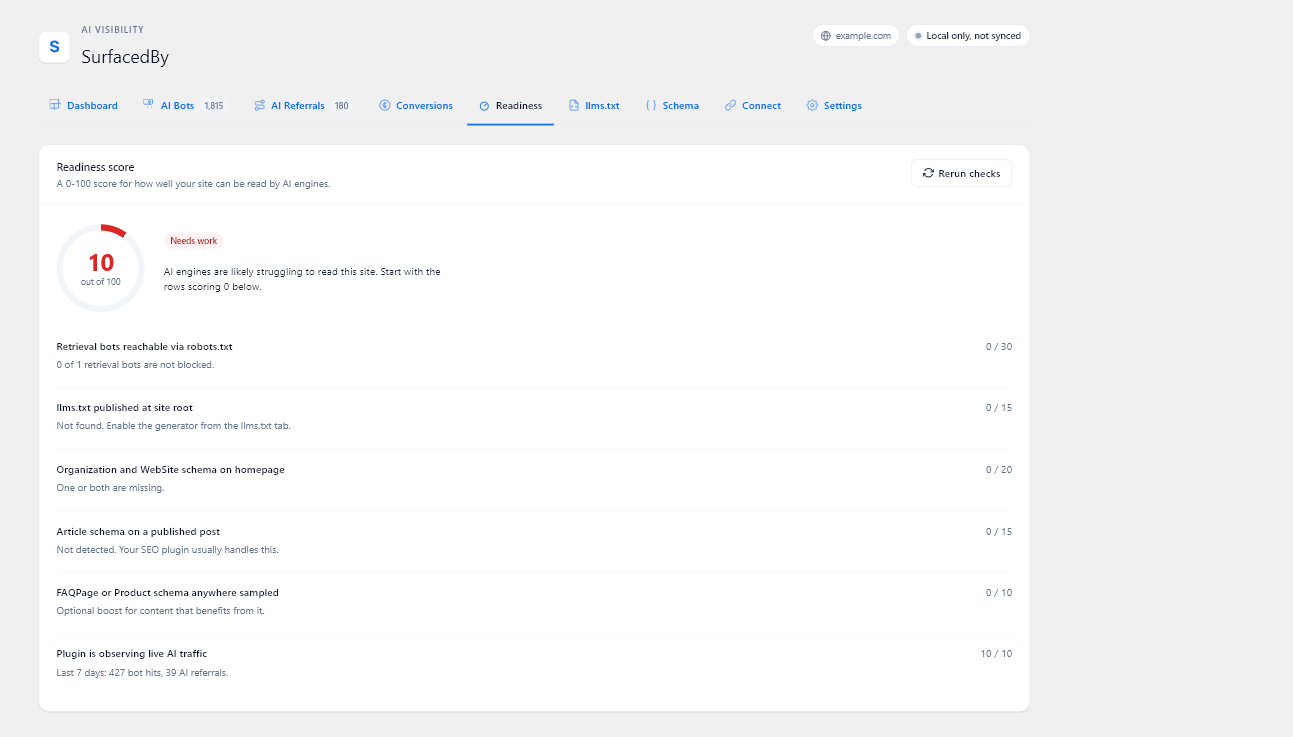
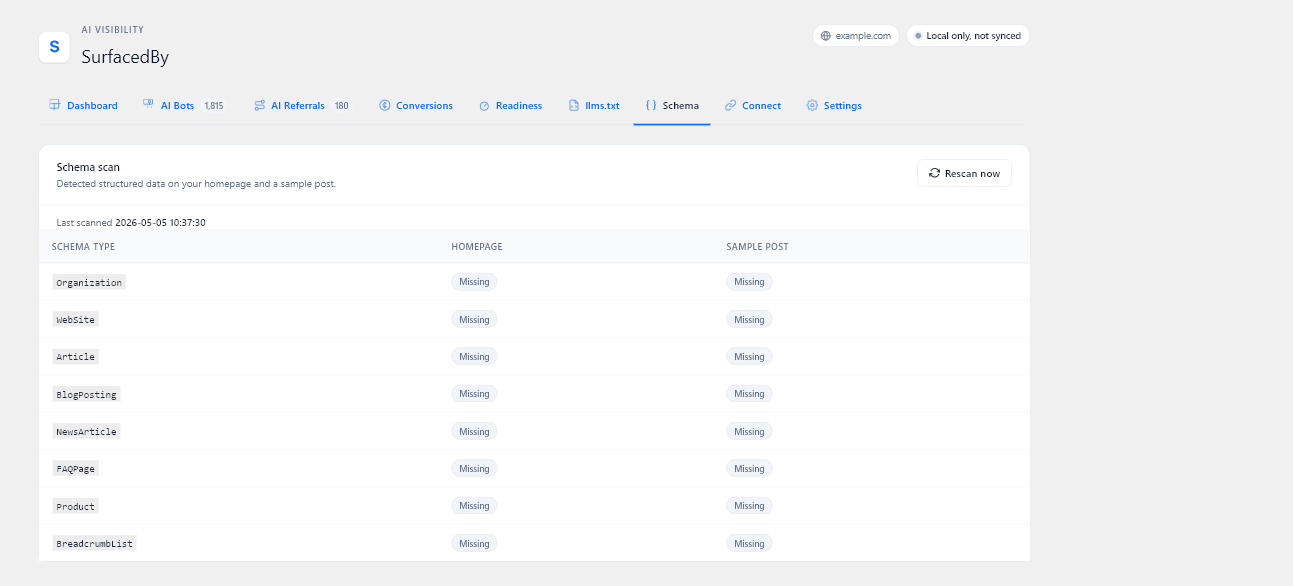
- AI readiness checks. Check whether your robots.txt, llms.txt, and page information help AI tools find and understand your content. The checks cover common page types such as articles, products, and FAQs.
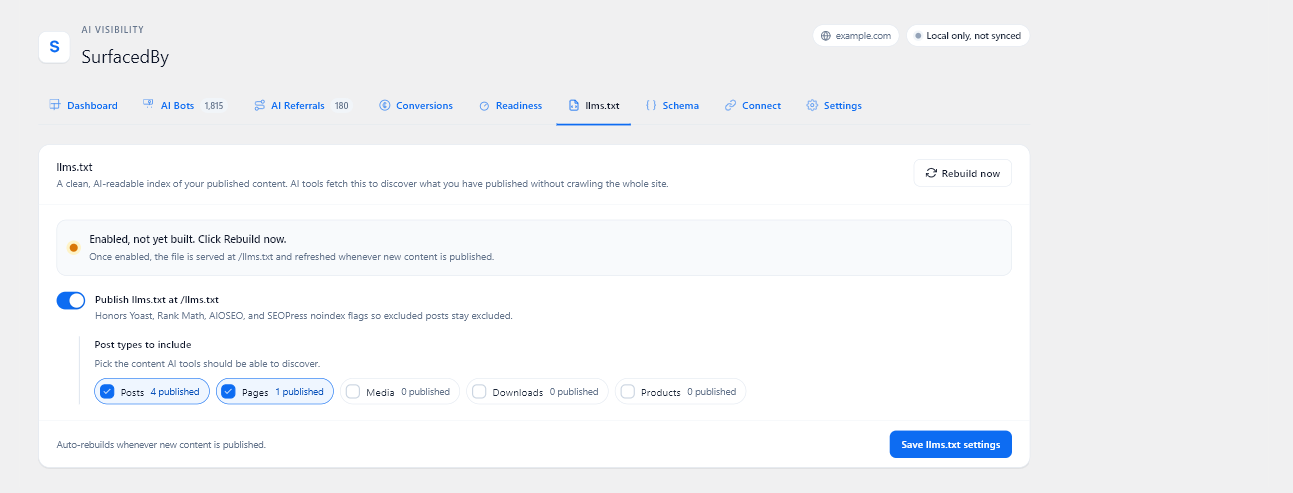
- llms.txt generator. Publish a
/llms.txtlist of your posts and pages. It follows the content exclusion settings in Yoast, Rank Math, AIOSEO, and SEOPress. - Sales and signup tracking. Record purchases, renewals, signups, and refunds from WooCommerce, Easy Digital Downloads, and MemberPress against the AI visit that brought the customer in. Custom checkouts can send events with
window.sbAi.track().
These features work without a SurfacedBy account. The plugin stores crawler requests, AI visits, and sales or signup records in your WordPress database. It does not contact SurfacedBy until you connect it.
Connecting the plugin to SurfacedBy is optional. It sends the records this plugin collects, including records saved before you connected, to your SurfacedBy dashboard. There you can see them alongside your site’s AI visibility, competitors, tracked prompts, and cited pages. Dashboard traffic views are included with SurfacedBy’s paid plans and trial.
External Services
The plugin makes no outbound calls until you save a SurfacedBy connection code or an older Site ID under SurfacedBy > Connect. Without a connection, the plugin keeps its records on your site.
After you connect, your server makes the three types of requests below. The browser tracker in item 4 sends data only to your own site. The plugin does not load code from SurfacedBy or another external source.
1. Event forwarding (when a page finishes rendering, plus an hourly wp-cron safety net)
- Endpoint:
https://api.surfacedby.com/api/v1/tracker/collector/batchfor connection codes, orhttps://api.surfacedby.com/api/v1/tracker/batchfor older Site ID-only installs. The connection-code path signs the request with a per-install secret and retries a saved batch ID after uncertain delivery. - Data sent: rows from the local log tables, in three kinds:
- Crawler rows: the crawler token, the request path, the time of the request, the response code, and the crawler’s IP address, used only to verify the crawler’s identity.
- Referral rows: the AI referrer host, the request path, the time of the visit, and a pseudonymous visitor ID.
- Conversion rows (when WooCommerce, Easy Digital Downloads, or MemberPress is detected, or when custom front-end code calls
window.sbAi.track): the event type (purchase, renewal, signup, refund, lead, or custom), an event ID and an order or subscription identifier, the value, the currency code, the time, the page path when the conversion happened on a page, the AI referrer host that first brought the customer in and how long before the conversion that visit was, and a small metadata object (for example the order number, the items bought with their product ID, name, quantity, and price, tax, shipping, the country code, or a refund reason, capped at 4 KB), plus the pseudonymous visitor ID when one is available. Conversion rows never carry names, emails, billing addresses, or payment details. - Each batch also carries your Site ID and your site’s domain name.
- The plugin never sends raw User-Agent strings outside the bundled crawler registry, never sends human visitor IPs, and never sends cookies. SurfacedBy uses a crawler’s IP only to decide whether it is verified, failed, unchecked, or has no documented verification method, and stores that verdict, not the IP. Behind Cloudflare, the plugin trusts the reported client IP only when the origin connection comes from a fresh published Cloudflare range. The local queue clears the crawler IP once the row is forwarded.
- Purpose: fills your SurfacedBy dashboard for this site.
2. Plugin heartbeat (hourly wp-cron with a 24-hour staleness check, plus a best-effort nudge when the last heartbeat is older than 20 hours)
- Endpoint:
https://api.surfacedby.com/api/v1/tracker/collector/heartbeatfor connection codes, orhttps://api.surfacedby.com/api/v1/integrations/wordpress/heartbeatfor older Site ID-only installs. - Data sent: your Site ID, a random install ID the plugin creates for this site, the plugin version, the WordPress version, the PHP version, the number of AI crawler and AI referral rows recorded in the last 24 hours, each store or membership plugin the plugin supports (WooCommerce, Easy Digital Downloads, and MemberPress) with whether it is active, its version, and the conversion types the plugin records for it, and the time of the most recent conversion recorded. No personal data.
- Purpose: shows the health of the install in SurfacedBy.
3. Crawler registry refresh (daily wp-cron)
- Endpoint:
https://api.surfacedby.com/api/v1/tracker/registry(HTTP GET) - Data sent: nothing beyond standard HTTP request headers.
- Purpose: pulls the latest list of AI crawlers and fresh Cloudflare origin ranges so new crawlers are tracked without waiting for a plugin update, and forwarded client IPs are accepted only from Cloudflare peers.
4. Browser tracker (on by default; switch it off under “Browser tracker snippet” in Settings. It needs no account and runs whether or not the plugin is paired)
- This sends nothing to SurfacedBy directly. The script is bundled with the plugin (
assets/js/sb-tracker.js) and served from your own site; no external script is loaded and no third-party code runs. It posts to your own site’s admin-ajax handler, and each request carries a WordPress security nonce from the page so the handler confirms it came from your site before recording anything. When a page was served from a cache for longer than that nonce stays valid, the script asks your own site for a current nonce and sends the event once more. - Data sent (to your own server): the AI referrer host, the URL path, the pseudonymous visitor ID, and, when custom front-end code calls
window.sbAi.track, the conversion event ID, value, currency, and the small metadata object the site passes in. The plugin sets only thesb_tandsb_attrcookies described in the Cookies section. - Those rows are stored in the local log tables and later forwarded to SurfacedBy by your server, through the endpoint in item 1.
- Purpose: catches AI visits on pages served from a full-page cache, where the PHP tracker never runs.
Cookies
The plugin sets cookies only after a visitor arrives from a confirmed AI referrer. There are two, both first-party and both opaque:
sb_t(30 minutes): an anonymous session nonce that stops one browsing session from being counted more than once. No personal identifiers.sb_attr(13 months): a pseudonymous visitor ID, the AI host (for example chatgpt.com), and the time of the first qualifying visit, so a later purchase or signup can be credited to the original source. When an AI-attributed landing URL carries them, it can also keep the advertising click IDs gclid, fbclid, msclkid, and ttclid. The browser tracker mirrors this value in first-party local storage so attribution survives browser cookie clean-up. The identifier is scoped to this site and is never used for cross-site tracking.
The commerce integrations and a site-initiated window.sbAi.track call can also create the pseudonymous sb_attr identifier when a conversion needs a stable local attribution key.
When paired with SurfacedBy, aggregate crawler, referral, and conversion history is kept with the connected domain. The raw AI visit rows used to rebuild visitor journeys follow the plan’s retention window: 90 days on Starter, 395 days on Professional, and 760 days on Agency. The dashboard’s journey view shows only the 30 days before a conversion.
Terms of Service: https://surfacedby.com/terms
Privacy Policy: https://surfacedby.com/privacy
Screenshots
Installation
- Install the plugin from the WordPress.org directory, or upload the zip.
- Activate it.
- Open SurfacedBy > Dashboard in the WordPress admin.
- Run the AI readiness checks. Crawler and referral tracking start automatically.
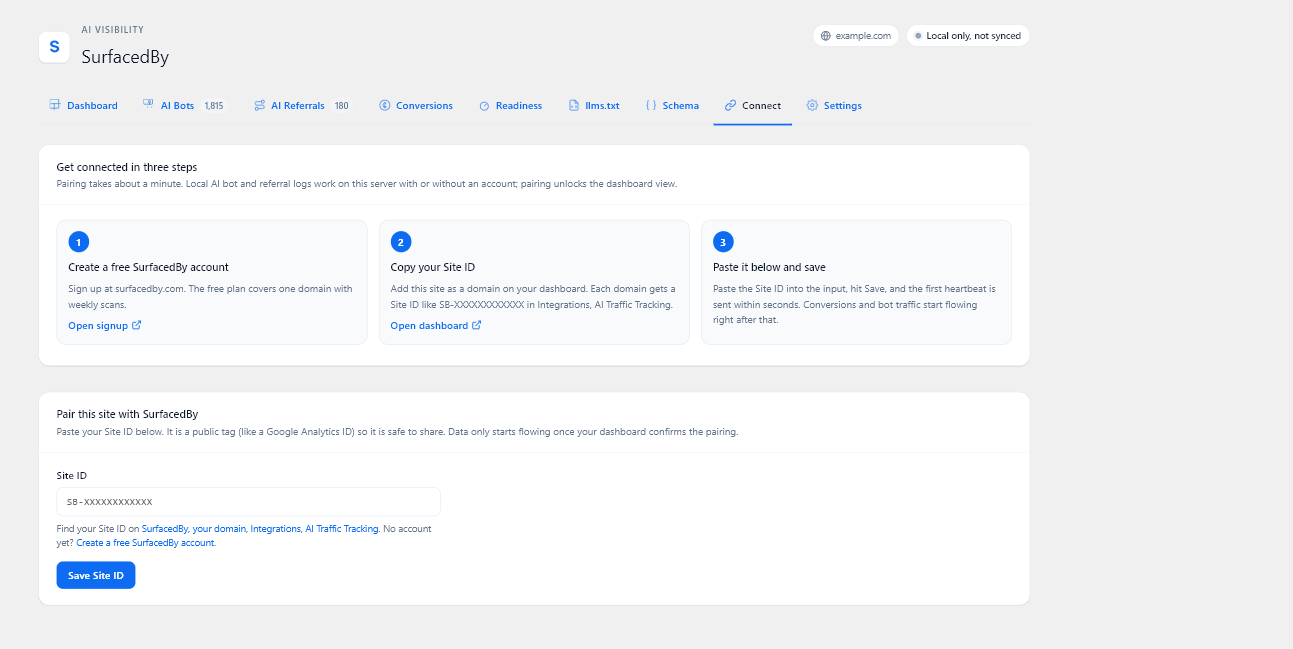
- Optional: connect the plugin to SurfacedBy. Sign in at surfacedby.com, add your site, copy the WordPress connection code from its Tracking page, then paste it into SurfacedBy > Connect and save. Syncing starts after the connection is verified. If you connected using only a Site ID, reconnect with a code to enable crawler verification.
FAQ
-
Does this plugin slow down my site?
-
The plugin checks requests in WordPress and uses a small script on pages served from a cache. The effect on your site’s speed depends on your hosting and traffic, so check performance on your own site after installing it.
-
Does this plugin track human visitors?
-
Yes, for visits that appear to come from a supported AI assistant. It does not count visits from Google, social media, or direct links as AI referrals. For an AI referral, it records the referring site, the page visited, the time, and pseudonymous identifiers used to link a later order or signup. Store integrations and
window.sbAi.trackcalls can record sale or signup details as described under External Services. -
What does pairing the plugin with SurfacedBy give me?
-
Connecting sends the crawler, visit, and sales or signup records from your site to your SurfacedBy dashboard. You can then see them alongside your site’s AI visibility and cited pages. The WordPress features continue to work when the plugin is not connected.
-
What if I block AI crawlers in robots.txt?
-
The plugin shows which crawlers you are blocking and what each one does (training, search indexing, or live answers). You choose the policy; the plugin never edits your robots.txt.
-
Will the plugin work with my SEO plugin?
-
Yes. You can keep using Yoast, Rank Math, AIOSEO, or SEOPress. The llms.txt generator follows their noindex and nofollow settings, so excluded content stays out of its list.
-
Does the plugin track WooCommerce orders or MemberPress signups?
-
Yes. When WooCommerce or MemberPress is active, the plugin records supported purchases, renewals, refunds, and signups against the AI visit that brought the customer in. No shortcode or checkout change is needed. For a checkout outside WordPress, your developer can send a purchase with
window.sbAi.track('purchase', { event_id, value, currency }). -
Can I turn conversion tracking off?
-
Yes. SurfacedBy > Settings has a “Track conversions” switch. Turning it off stops every integration and the JavaScript API at the source; nothing is recorded or forwarded.
-
Does it work with Easy Digital Downloads?
-
Yes, with Easy Digital Downloads 3.0 or later. The plugin records completed payments as purchases and tracks refunds separately, including partial refunds.
-
Can I forward Google Tag Manager purchases to SurfacedBy?
-
Yes. Turn on “GTM bridge” in SurfacedBy > Settings. The plugin listens for purchase events in Google Tag Manager and uses the GA4 transaction ID when it records them. Use the same order number in WooCommerce and GTM so a purchase reported by both is counted once.
-
Can I send conversions from outside WordPress (server-side webhook)?
-
Yes. SurfacedBy gives each domain a webhook URL and an HMAC-SHA256 secret that signs each delivery. Reveal the secret in the Setup drawer on the SurfacedBy dashboard’s Tracking page, then POST events to
https://api.surfacedby.com/api/v1/tracker/webhook/conversionswith theX-SurfacedBy-Site-Id,X-SurfacedBy-Timestamp, andX-SurfacedBy-Signature: t=<unix>,v1=<hex>headers. The signature covers<timestamp>.<body>with HMAC-SHA256, the same scheme as SurfacedBy’s outgoing webhooks. Requests older than 5 minutes are rejected, and each Site ID can send up to 100 requests a minute.Example:
curl -X POST https://api.surfacedby.com/api/v1/tracker/webhook/conversions \ -H "X-SurfacedBy-Site-Id: SB-XXXXXXXXXXXX" \ -H "X-SurfacedBy-Timestamp: 1715990400" \ -H "X-SurfacedBy-Signature: t=1715990400,v1=<hex>" \ -H "Content-Type: application/json" \ -d '{"event_type":"purchase","event_id":"4821","value":99.99,"currency":"USD","occurred_at":"2026-05-18T12:00:00Z"}' -
How does duplicate detection work across sources?
-
When this plugin, the GTM bridge, or a webhook reports the same purchase, SurfacedBy matches the records by event ID and keeps one. The dashboard shows when other sources reported it too. Use the same order number as the event ID in each source.
-
Can I add my own conversion integration?
-
Yes. Implement
\SurfacedBy\AIVisibility\Conversion\Adapters\ConversionAdapterand register your class with thesurfacedby_aiv_conversion_adaptersfilter. Integrations that provide an optional staticevents_covered()method appear in the dashboard’s coverage table.
Reviews
There are no reviews for this plugin.
Contributors & Developers
“SurfacedBy AI Visibility – AI Traffic, Crawler Analytics & llms.txt” is open source software. The following people have contributed to this plugin.
Contributors

Translate “SurfacedBy AI Visibility – AI Traffic, Crawler Analytics & llms.txt” into your language.
Interested in development?
Browse the code, check out the SVN repository, or subscribe to the development log by RSS.
Changelog
1.2.7
- New: Connect with a private code from your SurfacedBy dashboard. Existing Site ID connections still send visits and sales, but need to be reconnected with a code for crawler verification.
- Improved: Crawler requests that cannot be verified are shown separately. On Cloudflare sites, the plugin uses the reported visitor address only after checking that the request came through Cloudflare.
- Improved: If a response is lost while sending records to SurfacedBy, the plugin can retry without counting the same records twice.
- Improved: The connection status reports page caching that WordPress can detect and explains sync problems in plain language.
- Changed: The readiness card links to SurfacedBy’s free AI visibility check. Dashboard syncing is included with paid plans and the trial.
- Changed: The Connect tab shows where to find your Site ID on your site’s Tracking page in SurfacedBy.
- Fixed: A hosting security page shown in place of llms.txt or robots.txt is no longer treated as either file.
- Fixed: An AI crawler reading a page link that an AI platform cited is now recorded only as a crawl, not also as a visit from that AI platform.
- Fixed: AI visits now count only real page views. Requests that only check a page, error pages, feeds, a page’s own background requests, and automated browsers no longer add a visit.
- Fixed: A sale is now linked to the AI visit that brought the customer in. The plugin could not read back the attribution cookie it set, so the visit and the sale were recorded under two different visitors.
- Fixed: AI visits on pages that stay in a page cache for 12 hours or more are recorded again. The browser tracker now fetches a fresh security token when the one saved in the cached page has expired.
- Fixed: The browser tracker no longer runs on error pages, feeds, or embeds, so it counts the same pages as the server-side tracker.
- Fixed: Pages the browser only preloads in the background, and AI crawlers that run the tracker script, no longer add AI visits.
- Fixed: A visit tagged as coming from an AI assistant only in the link (in-app browsers hide where a visitor came from) is still counted when your site redirects the visitor to an address without the tag.
- Fixed: Page addresses with non-English characters are recorded in full instead of losing those characters.
- Fixed: The browser tracker’s protection against script optimizers such as Cloudflare Rocket Loader and PageSpeed now applies to the tracker script itself.
- Fixed: WooCommerce orders placed through the block checkout are now credited to the AI source that brought the customer in.
- Fixed: When you complete or refund an order in the admin, the sale is no longer credited to your own AI visits. The source saved at checkout is used for WooCommerce, Easy Digital Downloads, and MemberPress.
- Fixed: Easy Digital Downloads orders are tracked correctly on EDD 3, including purchases confirmed later by a payment gateway or a background task.
- Changed: Easy Digital Downloads conversion tracking now requires Easy Digital Downloads 3.0 or later.
- Fixed: Saving the llms.txt tab no longer switches off the browser tracker and conversion tracking or resets log retention, and saving the Settings tab no longer switches off llms.txt.
- Fixed: The plugin claims the /llms.txt address only while its llms.txt generator is on, so another plugin or a static file can serve it otherwise. Deactivating the plugin releases it too.
- Fixed: Password-protected posts are left out of llms.txt.
- Fixed: Scheduled tasks (syncing events, the heartbeat, log clean-up, and the crawler list refresh) come back automatically if they go missing.
- Fixed: On multisite networks every site is set up when the plugin is network-activated or a new site is added, and deleting the plugin cleans up every site that asked for it, including the plugin’s install ID.
- Improved: Busy sites run fewer database checks when sending events to SurfacedBy.
- Improved: CSV exports follow standard CSV quoting and stay compatible with newer PHP versions.
- Changed: The plugin name now says what it does: AI traffic, crawler analytics, and llms.txt.
1.2.6
- Changed: The browser tracker now sends its events through the WordPress handler built for submissions from logged-out visitors. Tracking behaviour and the data recorded are unchanged.
- Fixed: Exported CSV files no longer let a recorded page address be treated as a formula by a spreadsheet application when the file is opened.
- Fixed: A tracking request carrying an unexpected value type is now ignored cleanly instead of adding a PHP warning to the site’s error log.
- Fixed: When SurfacedBy rejects a batch of events, the plugin now reports that and moves on instead of resending the same batch on every scheduled run until it expires, which held up the events queued behind it.
1.2.5
- Fixed: Purchases recorded from WooCommerce, Easy Digital Downloads, and MemberPress no longer report the home page as the page that earned the sale. These run after checkout, away from any page, so the sale is now recorded without a page instead of being credited to the wrong one.
- Fixed: The top converting pages list no longer counts sales that have no page attached to them.
1.2.4
- Fixed: Button labels remain readable in their normal, visited, hover, focus, and active states throughout the WordPress admin.
1.2.3
- Security: Browser event writes are gated by a WordPress nonce that is verified in the REST permission callback before the write runs.
- Security: Duplicate conversion detection now uses a prepared WordPress database query instead of inspecting the database driver directly.
- Fixed: Admin icons and generated markup are escaped at output time using a narrow SVG allow-list.
- Improved: Plugin-owned cache keys use the full surfacedby_aiv prefix.
- Improved: Privacy disclosures now describe pseudonymous identifiers, local storage, advertising click IDs, and individual event forwarding. Logged-in attribution can be exported and erased with WordPress privacy tools.
- Compatibility: No settings changes or data migration are required.
- Compatibility: Tested with WordPress 7.0.2.
1.2.2
- Changed: The browser tracker no longer requires a SurfacedBy account. It records AI referrals and conversions into your own database on a fresh install, with no Site ID and no pairing. Connecting an account only syncs that data to the dashboard.
- New: Events captured before you connect are kept and sync automatically once you do, so pairing an existing install does not start from zero.
- New: Settings shows how many events are stored locally and waiting to sync.
- Fixed: Conversion logs were never pruned by the retention cron, so the table grew without bound on sites that kept their data local.
- Fixed: A commerce integration that declared its event list as a non-static method caused a fatal error when the plugin read it.
- Hardened: Cookie, header, and server values are sanitised on read, and the referrer host recovered from the attribution cookie is validated as a hostname before it is stored or forwarded.
1.2.1
- New: Trials are a first-class conversion type, so a trial start, its conversion to paid, later renewals, and refunds each show up separately instead of collapsing into one purchase.
- New: Crawler identity verification. A request claiming to be an AI crawler is checked against the crawler’s published address ranges, so spoofed traffic is not counted as a real AI crawler.
- Improved: AI crawls of
robots.txtandllms.txtare now recorded, so you can see which crawlers are reading your AI access rules. - Improved: The attribution cookie is capped at 13 months from the first time it was set.
1.2.0
- Improved: AI visits are now tracked reliably on sites that use caching or a CDN such as Cloudflare. This works automatically; you can turn it off under Settings if you ever need to.
- Improved: AI visits are still matched to the sale on browsers with strict privacy settings, such as Safari, so your conversion reports stay accurate.
- Improved: Subscription renewals are now credited to the AI source that won the original sale, so recurring revenue keeps showing up in your AI reports for the life of the subscription.
1.1.0
- New: AI conversion tracking. Auto-detects WooCommerce and MemberPress and records purchases, renewals, signups, and refunds against the AI source that brought the customer in.
- New:
window.sbAi.track()JavaScript API for custom front-ends and checkouts outside WordPress (Shopify Hydrogen, headless storefronts). - New:
sb_attrattribution cookie so conversions are credited to the AI platform even days after the original visit. - New: Conversions admin tab with 7-day totals, a breakdown by type, and a recent-activity table, shown only when at least one supported platform is detected.
- New: Integration registry (
surfacedby_aiv_conversion_adaptersfilter) for plugins that want to register additional conversion integrations without forking. - Improved: Conversion rows now ship alongside crawler and referral rows on the same hourly cron and page-render path.
- Improved: Repeated events are recognised by a stable event ID, so a re-fired purchase or a replayed webhook is not counted twice.
1.0.0
- Initial release.