
Description
Contentpass is a privacy-focused monthly subscription for readers. With one registration, Contentpass users visit participating websites ad-free and without being tracked, while publishers receive subscription revenue that matches lost ad revenue at ad market rates.
The Contentpass Integration plugin integrates Contentpass with your site so you can combine consent management, script control, and Contentpass configuration from the WordPress admin.
Features
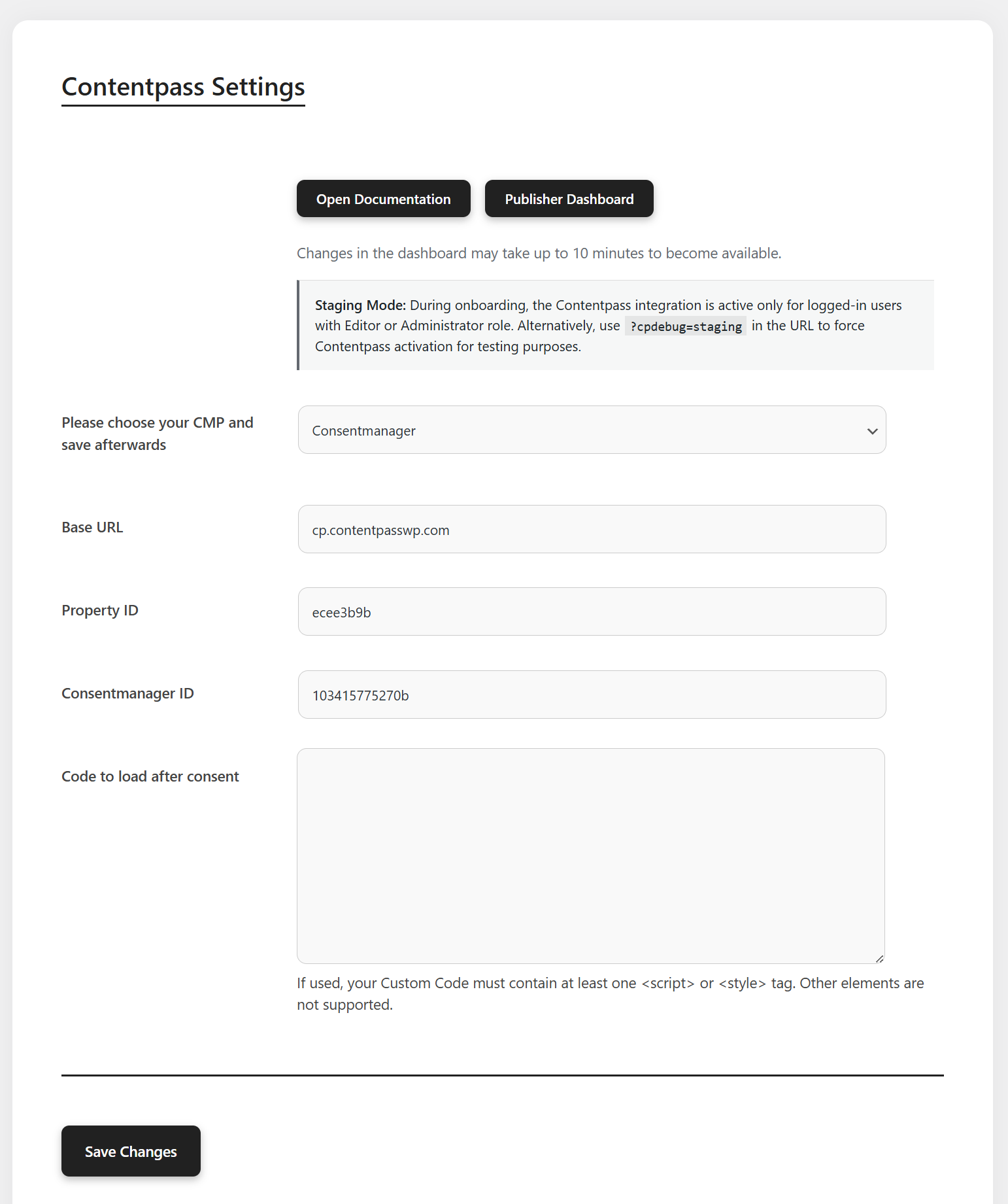
- Integration – Configure your Contentpass property (base URL, ID), choose your Consent Management Platform (CMP), and manage staging vs production behaviour.
- CMP support – Built-in hooks for major CMPs (for example Consentmanager, Didomi, CCM19, OneTrust, Usercentrics V2/V3, Sourcepoint). Choose whether the CMP is already on your site or should be loaded by the plugin (Consentmanager via validated snippet paste).
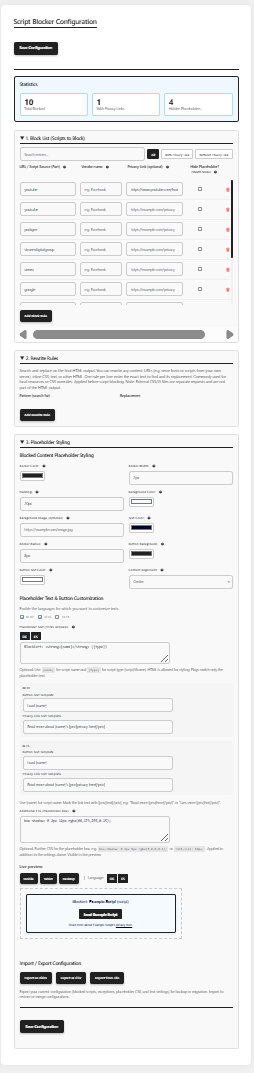
- Blocking Rules – Define patterns to scan for or exclude, with admin UI for script blocking aligned with your consent setup.
- Request Contract – Quick link to the Contentpass publisher contact flow with tracking parameters for support context.
- Staging mode – Limit Contentpass loading to logged-in editors and administrators while you test; optional URL debug flag for broader testing.
Admin screens require the manage_options capability by default (filterable via cp4wp_required_capability).
External services
This plugin connects to third-party services so you can integrate Contentpass and a Consent Management Platform (CMP) with WordPress. Only the services that match your plugin settings are used (one CMP at a time, plus Contentpass when configured and not in a disabled/staging-only state). No data is sent to CMP vendors you have not selected.
Contentpass (API and CDN)
Used to load the Contentpass integration (now.js), CMP-specific JavaScript stubs, and property configuration.
- What it is used for: Subscription and consent integration on the front end; verifying that your property CNAME and
config.jsonare reachable during setup and admin saves. now.js(mandatory): The plugin always loadsnow.jsfrom the publisher’s configured Contentpass base URL when Contentpass is active. This is part of the official Contentpass integration contract, not user-supplied executable code. The URL is derived from the validated base URL setting (not a free-text script field).- What data is sent and when:
- From the WordPress server (admin/setup): HTTP GET requests to
https://{your-contentpass-base-url}/properties/{property-id}/config.jsonwhen you save settings, use “Check again”, or when the plugin refreshes cached configuration. These requests include the plugin User-Agent (Contentpass-WP/{version}) and your configured property ID. They do not include front-end visitor form input. - From the visitor browser (front end, when Contentpass loading is active): Scripts from your Contentpass base URL (for example
{base-url}/now.js) and fromhttps://static.contentpass.net/stubs/…to connect Contentpass with the selected CMP. The browser may send standard web request metadata (IP address, User-Agent, cookies, consent/subscription signals) to Contentpass as described in their documentation.
- From the WordPress server (admin/setup): HTTP GET requests to
- Service provider: Content Pass GmbH (Contentpass)
- Terms of service: https://www.contentpass.net/en/terms
- Privacy policy: https://www.contentpass.net/en/privacy
Consentmanager
Loaded when Consentmanager is selected as the CMP in plugin settings.
- What it is used for: Displaying the Consentmanager cookie/consent banner and passing consent signals to ads and tags.
- Third-party script: The plugin loads Consentmanager’s semi-automatic CMP loader from the validated
srcURL in your pasted snippet (typicallyhttps://cdn.consentmanager.net/delivery/js/semiautomatic.min.js). Only allowlisteddata-cmp-*attributes are used; pasted markup is parsed and not echoed raw. Paste the external semi-automatic script from Consentmanager Get Code in the plugin settings when Plugin should also load the CMP is selected. - What data is sent and when: From the visitor browser to Consentmanager hosts (
cdn.consentmanager.net,delivery.consentmanager.net, and related endpoints) when the CMP script loads and when visitors interact with the banner. Data typically includes the configured Code-ID, page URL, consent choices, and standard request metadata (IP address, User-Agent, cookies). The WordPress server does not proxy visitor consent to Consentmanager. - Service provider: consentmanager AB (consentmanager.net)
- Terms of service: https://www.consentmanager.net/en/general-terms-and-conditions/
- Privacy policy: https://www.consentmanager.net/en/privacy/
Didomi
Loaded when Didomi is selected as the CMP.
- What it is used for: Didomi consent banner and preference management via the Didomi SDK.
- What data is sent and when: From the visitor browser to
https://sdk.privacy-center.org/(loader and related Didomi endpoints) when the CMP is enqueued. Requests include your Didomi API key, the site hostname (targetparameter), and—depending on configuration—geo hints, consent state, and standard request metadata. Contentpass stub scripts may also load fromhttps://static.contentpass.net/stubs/didomi/latest.jswhen Contentpass integration is active. - Service provider: Didomi SAS
- Terms of service: https://tos.console.didomi.io/
- Privacy policy: https://www.didomi.io/privacy-policy
CCM19
Loaded when CCM19 is selected as the CMP.
- What it is used for: CCM19 cookie consent banner and consent storage.
- What data is sent and when: From the visitor browser to
https://cloud.ccm19.de/app.js(with your configured API key and domain ID as query parameters) when the CMP loads and when visitors give or change consent. Standard request metadata (IP address, User-Agent, cookies, consent records) may be processed by CCM19. Contentpass stub scripts may load fromhttps://static.contentpass.net/stubs/ccm19/latest.jswhen Contentpass integration is active. - Service provider: Papoo Software & Media GmbH (CCM19)
- Terms of service: https://www.ccm19.de/agb.html
- Privacy policy: https://www.ccm19.de/en/wissen/datenschutzerklaerung.html
OneTrust
Loaded when OneTrust is selected as the CMP.
- What it is used for: OneTrust cookie consent banner and category/vendor consent via
otSDKStub.js. - What data is sent and when: From the visitor browser to
https://cdn.cookielaw.org/(OneTrust Cookie Consent CDN) using your configured domain script ID when the CMP loads and when visitors interact with the banner. Standard request metadata and consent choices may be sent to OneTrust. Contentpass stub scripts may load fromhttps://static.contentpass.net/stubs/onetrust/latest.jswhen Contentpass integration is active. - Service provider: OneTrust (Cookie Consent / Cookie Law)
- Terms of service: https://legal.onetrust.com/#masterterms
- Privacy policy: https://www.onetrust.com/privacy-notice/
Usercentrics
Loaded when Usercentrics V2 or V3 is selected as the CMP.
- What it is used for: Usercentrics consent banner and TCF/consent management.
- What data is sent and when: From the visitor browser to Usercentrics endpoints (for example
https://web.cmp.usercentrics.eu/orhttps://app.usercentrics.eu/, depending on version) with your settings ID when the CMP loads and when visitors interact with it. Consent records, page context, and standard request metadata may be processed by Usercentrics. Contentpass stub scripts may load fromhttps://static.contentpass.net/stubs/usercentrics/latest.jswhen Contentpass integration is active. - Service provider: Usercentrics GmbH
- Terms of service: https://usercentrics.com/terms-and-conditions/
- Privacy policy: https://usercentrics.com/privacy-policy-cmp/
Sourcepoint
Loaded when Sourcepoint is selected as the CMP (or when Sourcepoint helper scripts are used in Manual mode).
- What it is used for: Sourcepoint consent messaging and privacy manager (
wrapperMessagingWithoutDetection.js). - What data is sent and when: From the visitor browser to
https://cdn.privacy-mgmt.com/(and related Sourcepoint endpoints configured in your account) when messaging scripts load and when visitors give or update consent. Account/property identifiers, consent strings, page URL, and standard request metadata may be sent. Contentpass stub scripts may load fromhttps://static.contentpass.net/stubs/sourcepoint/latest.jswhen Contentpass integration is active. - Service provider: Sourcepoint Technologies, Inc.
- Terms of service: https://sourcepoint.com/terms-of-use/
- Privacy policy: https://sourcepoint.com/privacy-notice/
Post-consent ad / tag URLs (optional publisher setting)
Some publishers need specific third-party ad or analytics scripts to load only after consent (for example GPT, Prebid, or network tags). The plugin provides optional URL fields for this purpose.
- What it is used for: Loading external JavaScript files by URL after the CMP reports full consent, alongside the plugin’s script-blocking unblock flow.
- What publishers can enter: Only
http://orhttps://script source URLs in structured admin fields (max 20). No inline JavaScript, HTML, PHP, or CSS can be saved. - How the plugin outputs scripts: It builds
<script src="…" async defer class="cpnotblocked">tags programmatically from validated URLs.javascript:,data:, and other non-URL schemes are rejected at save time. - What data is sent and when: From the visitor browser to the hosts in the configured URLs, only after consent, when those tags are injected.
Optional admin links
The plugin admin may link to Contentpass documentation and the publisher dashboard (for example https://docs.contentpass.net/ and https://publisher.contentpass.net/). These open in the browser when an administrator clicks them; they are not automatic background requests to third parties.
Screenshots
Installation
- Upload the
contentpass-integrationfolder to the/wp-content/plugins/directory, or install the ZIP from your distribution package. - Activate Contentpass Integration through the Plugins screen in WordPress.
- Open Contentpass in the admin menu and complete Integration (CMP, URLs, IDs, staging).
- If you use script blocking, review Blocking Rules and save your patterns.
- When ready for all visitors, turn off staging mode and verify consent and Contentpass behaviour on the front end.
FAQ
-
Do I need a Contentpass publisher account?
-
Yes. You need Contentpass-side configuration (including property URL / CNAME as required by Contentpass). Use Request Contract in the admin menu if you need to contact Contentpass.
-
Why does the plugin load now.js from my Contentpass base URL?
-
now.js is required by the Contentpass platform. It is not optional custom code and not pasted by the publisher. The plugin loads it only from the publisher’s configured Contentpass property base URL (for example
https://cp.example.com/now.js) after that URL is validated during setup. This script powers subscription and consent integration together with the official Contentpass stubs fromstatic.contentpass.net. Withoutnow.js, Contentpass cannot function on the site. -
What are “Scripts to load after consent”?
-
This is an optional list of external script URLs only (for example your ad network’s
https://…/ads.js). Publishers enter URLs in dedicated fields; the plugin does not accept arbitrary HTML, inline JavaScript, PHP, or CSS. Each value is sanitized (esc_url_raw), must usehttp://orhttps://, and is output only as a programmatic<script src="…" async defer>tag after consent. Legacy free-form “custom code” markup was removed in favour of this structured URL list. This matches the consent workflow: third-party tags blocked before consent may be loaded again after the visitor accepts. -
What is staging mode?
-
When staging is active, Contentpass integration is shown only to logged-in users with Editor or Administrator roles, so you can test without affecting all visitors. Production mode serves Contentpass according to your saved settings.
-
Which WordPress and PHP versions are supported?
-
The plugin header declares WordPress 6.3+ and PHP 7.4+. Newer releases may raise these; check the plugin main file after updates.
-
Can I change who may access the plugin settings?
-
Yes. Developers can use the
cp4wp_required_capabilityfilter to require a different capability thanmanage_options. -
Does this plugin send data to external services?
-
Yes, when configured. See the External services section above for each provider, what is transmitted, and links to terms and privacy policies. Only your selected CMP and Contentpass endpoints are used.
Reviews
There are no reviews for this plugin.
Contributors & Developers
“Contentpass Integration” is open source software. The following people have contributed to this plugin.
Contributors
Translate “Contentpass Integration” into your language.
Interested in development?
Browse the code, check out the SVN repository, or subscribe to the development log by RSS.
Changelog
1.0.1
- Add CMP integration mode (already on site vs plugin loads CMP) and Consentmanager semi-automatic snippet paste with validation.
- Load Consentmanager semi-automatic CMP script from Consentmanager CDN instead of a bundled minified loader; clarify Code-ID (data-cmp-cdid) in admin settings.
- Fix post-consent script unlock and watchdog race conditions with OneTrust and dynamic ad scripts.
- Asset cache busting via updated plugin version query string.
- Document third-party/external services in readme (WordPress.org compliance).
- Scope elevated PCRE backtrack limit to script-scan replacements only; restore previous value after use.
- Replace global output-buffer callback with WordPress 6.9 template enhancement filter; legacy buffers are explicitly closed on shutdown.
- Add legacy output-buffer fallback on WP 6.9+ when the core template enhancement buffer is skipped or cancelled.
- Limit DONOTCACHEPAGE to staging/debug requests that actually load Contentpass, not all front-end pages.
- Sanitize Accept-Language header and placeholder language cookie input before validation.
- Escape SVG branding, custom ad code, and placeholder CSS on output (late escaping).
- Harden admin output escaping in script scan and settings screens (esc_attr, wp_kses, sanitized query args).
- Protect ?cpdebug=staging and ?cpdebug=settings with an Integration debug password (?cpdebug_key); limit anonymous cache bypass to staging sites only; sanitize admin preview HTML in JS.
1.0
- Current stable release (see plugin header and repository for detailed changes).